Celestron 114LCM Computerized Telescope Review: Worth It? (November 2026)
The Celestron 114LCM computerized telescope suits beginners who want guided object finding through a GoTo mount and Sky Tour button. Its setup depends on aligning three bright objects, so choose a simpler manual telescope if you prefer to point and observe without computer setup.
On this page (9 sections)
- What does the Celestron 114LCM offer?
- How does alignment work?
- What can the Sky Tour and GoTo mount do?
- Which eyepieces and accessories are included?
- What are the main trade-offs?
- How does the 114LCM compare with manual and optical-tube alternatives?
- Can you connect the 114LCM to a computer?
- Is the Celestron 114LCM worth choosing?
- How we scored the Celestron 114LCM
The Celestron 114LCM computerized telescope is for beginners who want a GoTo mount to help locate celestial objects. Its hand control can search thousands of targets, and the Sky Tour button can suggest objects visible at the time.
That convenience comes with an alignment step: you center three bright objects in the eyepiece before the mount can orient itself. If you want to aim by hand without aligning electronics, a tabletop Dobsonian is a more direct option.
What does the Celestron 114LCM offer?
The 114LCM combines a Newtonian reflector, motorized altazimuth mount and hand control in a beginner-focused package. Its key reason to consider it is automated object finding, rather than a manual mount or a phone-first control system.
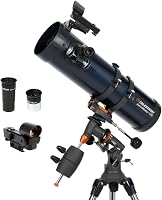
Celestron 114LCM Computerized Reflector Telescope for Beginners: Best for guided object finding

- 114 mm computerized Newtonian reflector
- GoTo mount for up to 4,000 objects
- Sky Tour button
- 25 mm and 9 mm eyepieces
A beginner focused reflector with a computerized mount, Sky Tour function and a red dot finder. Its appeal depends on whether you want automated object locating and are comfortable completing alignment.
Pros
- Computerized GoTo mount
- Sky Tour suggests visible targets
- Two eyepieces included
- Full-height tripod and StarPointer finder included
Cons
- Requires alignment on three bright objects
- Computerized setup adds steps before observing
- The 9 mm eyepiece gives a narrower view than the 25 mm
The telescope has all-glass optics and comes with 25 mm and 9 mm eyepieces. The 25 mm is the wider starting view, while the 9 mm gives a narrower view; both are included so you can compare them as you observe.
The full-height tripod, StarPointer red dot finder and NexStar+ hand control are also included. The Sky Tour button offers a list of objects currently visible, which can help when you want a starting point for an observing session.
Who is the 114LCM best for?
Choose it if you want the mount to help you locate targets and are willing to follow an alignment procedure. That can make an observing session easier to plan than searching the sky one object at a time.
It may be a poor fit if you want to take the telescope outside and begin aiming immediately, or if learning electronic controls sounds like extra work. A manual scope avoids that setup, though it also leaves target locating to you.
For a wider look at entry-level choices, compare our best computerized telescope for beginners guide.
How does alignment work?
The 114LCM uses three bright objects to calculate its position and orient to the night sky. You center each object in the eyepiece as part of the SkyAlign procedure, then the mount can guide the telescope toward selected targets.
Give yourself time to learn the steps before a group observing session. An unobstructed view of several bright objects makes it easier to follow the alignment process.
The StarPointer red dot finder helps you aim at a bright object before centering it through the main telescope. The procedure still requires you to identify and center the alignment objects, so the GoTo feature does not remove every manual step.
After alignment, the hand control can select targets for the mount to locate. Use the Sky Tour button when you want suggestions for objects available in the current sky.
What can the Sky Tour and GoTo mount do?
The GoTo mount can automatically locate thousands of celestial objects, and Sky Tour can offer a list of visible targets. These features are aimed at people who want help choosing and finding objects rather than learning every position from a star chart.
Automated pointing is most useful when the telescope is aligned correctly and has a clear view of the sky. Trees, buildings or other obstructions can limit what you can observe, even when an object is in the mount's target list.
The telescope also includes a free download of Starry Night software for simulating the sky from different locations and planning sessions. The product information doesn't specify which current software versions or operating systems are supported, so check compatibility before depending on a computer workflow.
The 114LCM can work with Celestron's SkyPortal app for audio descriptions, according to Celestron's product description. If app control is your main priority, compare it with our guide to the best telescope with app.
Which eyepieces and accessories are included?
The package includes 25 mm and 9 mm eyepieces, a StarPointer finder and a full-height tripod. This gives you basic parts for locating and viewing targets without first choosing separate eyepieces.
Start with the 25 mm eyepiece when you locate a target. Its wider view can make initial aiming easier than beginning with the 9 mm eyepiece, whose narrower view makes small aiming errors more noticeable.
The StarPointer is a red dot finder that helps you point the tube toward a target. It works alongside the main eyepiece, which you use to center an object more precisely.
Celestron's product description also mentions a download of Starry Night software and the SkyPortal app. Those tools can help with planning or identifying objects, but they don't replace the telescope's three-object alignment procedure.
What are the main trade-offs?
The 114LCM's main benefit is guided target finding; its main trade-off is the extra setup that computerized pointing requires. Consider how much you value help finding objects compared with a simple manual mount.
| Detail | Celestron 114LCM |
|---|---|
| Optical design | Newtonian reflector |
| Mount | Motorized altazimuth GoTo |
| Alignment | Center three bright objects |
| Included eyepieces | 25 mm and 9 mm |
| Finder | StarPointer red dot |
| Tripod | Full-height tripod |
| Control | NexStar+ hand control |
| Weight | 13.2 lb |
The data gives no aperture measurement for the 114LCM, so this review doesn't compare its light gathering with the alternatives below. Decide based on the features provided and check the current manual for the full technical specifications.
An automated mount also depends on a power source. The listed battery requirement is one included CR2032 battery, but the product information doesn't state the full power setup for the motorized mount.
Check Celestron's manual for its power requirements before planning an outing.
How does the 114LCM compare with manual and optical-tube alternatives?
The 114LCM is the ready-to-use choice here for computerized object finding. The Sky-Watcher offers a larger stated aperture in a manual tabletop design, while the SVBONY is an optical tube that requires separate mount and eyepiece choices.
The Heritage 130 comes fully assembled and includes 10 mm and 25 mm eyepieces plus a StarPointer finder. It won't locate targets automatically, so you steer it by hand and provide a stable tabletop surface.
If the trade-off is mainly between manual aiming and computerized guidance, see our Celestron StarSense Explorer vs AstroMaster comparison for other Celestron approaches to finding objects.
The MK127 is a Maksutov-Cassegrain optical tube with a dual-speed focuser and a 0.65x flat-field reducer. It has no included mount, eyepiece or finder, so budget your setup around those missing parts.
The 114LCM's supplied tripod and eyepieces make it the more complete starting package of these three. The SVBONY gives you more control over the rest of the setup, but that flexibility requires compatible equipment.
Can you connect the 114LCM to a computer?
Computer use depends on the hand control, cable and software compatibility. The included Starry Night software supports sky simulation and session planning, but that alone doesn't confirm a direct laptop connection for controlling the mount.
Before buying a cable or adapter, check Celestron's current compatibility details for model 31150 and the hand control. For software-assisted mount control, our Celestron telescope driver and ASCOM guide explains what to check.
If you want the computer to display or control a session, start with the guide to a telescope connected to a laptop. Confirm the required connection hardware and software versions before buying accessories.
Is the Celestron 114LCM worth choosing?
The 114LCM is worth considering if automated object locating and guided target suggestions matter more to you than a minimal setup. The GoTo mount, Sky Tour button, two eyepieces and full-height tripod make a clear package for a beginner exploring computerized observing.
Pick the Heritage 130 if you prefer a manual tabletop reflector with a stated 130 mm aperture. Pick the SVBONY only if you want an optical tube and have a plan for its mount, eyepiece and finder.
If solar observing is your goal, start with our best telescope for solar viewing guide and use only equipment designed for safe solar observation. For other Celestron options, compare our best Celestron telescope under 500 dollars guide.
How we scored the Celestron 114LCM
Our score weighs listed specifications, features and buyer feedback against the needs of someone shopping for a computerized beginner telescope. The 114LCM scores well for its GoTo mount, Sky Tour function and included observing accessories.
The score also reflects the alignment steps and the extra planning involved in a computerized setup.
Frequently asked questions
Does the Celestron 114LCM find objects automatically?
The 114LCM's computerized GoTo mount can locate thousands of celestial objects after alignment. The setup procedure uses three bright objects centered in the eyepiece so the telescope can calculate its position.
It can also suggest objects currently visible through its Sky Tour function.
What comes with the Celestron 114LCM?
The 114LCM includes a full-height adjustable tripod, 25 mm and 9 mm eyepieces, a StarPointer red dot finder and a NexStar+ hand control. It also includes access to Starry Night software; check current compatibility and download steps before planning around a particular device.
Is the Celestron 114LCM good for beginners?
It can suit beginners who want guided object finding and are willing to learn alignment. The computerized mount adds setup steps, while the Sky Tour feature can suggest targets when you aren't sure what to observe.
A manual Dobsonian is simpler if you want to aim the telescope yourself.
Can I connect the Celestron 114LCM to a laptop?
A computer connection depends on the hand control, cable and software setup you choose. Check Celestron's current compatibility guidance before buying an adapter, then follow a dedicated guide to connecting a telescope to a laptop.