7 Best App-Controlled Telescopes (November 2026)
The best app-controlled telescopes include the ZWO Seestar S30 Pro Smart Telescope for app-led deep-sky imaging, the Gskyer Telescope for phone-assisted snapshots, and the Celestron NexStar 8SE Computerized Telescope for large-aperture GoTo viewing.
On this page (7 sections)
- How we chose app-controlled telescopes
- Compare telescope app features
- The best telescopes with apps for different observing styles
- Which app-controlled telescope style should you choose?
- What should you check before choosing a telescope app?
- More guides on this topic
- Which is the best telescope with app control for you?
The best telescope with app control for automated deep-sky imaging is the ZWO Seestar S30 Pro. For phone-guided eyepiece viewing, choose the Celestron StarSense Explorer LT 114AZ; for a manual telescope that can take phone snapshots, consider the Gskyer.
“App-controlled telescope” can describe very different setups. Some apps only show you where to point, some control a motorized mount, and smart telescopes use the phone as the viewing and imaging screen.
Our picks at a glance
-
1
 Best for app-led deep-sky imaging
ZWO Seestar S30 Pro Smart Telescope
9.7/10 our score
See it on Amazon -
2
-
3
 Best for large-aperture GoTo viewing
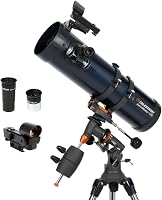
Celestron NexStar 8SE Computerized Telescope
9.4/10 our score
See it on Amazon
- 4
 Check it
Celestron StarSense Explorer LT 114AZ Newtonian Smartphone
Best for guided eyepiece observing - 5
 Check it
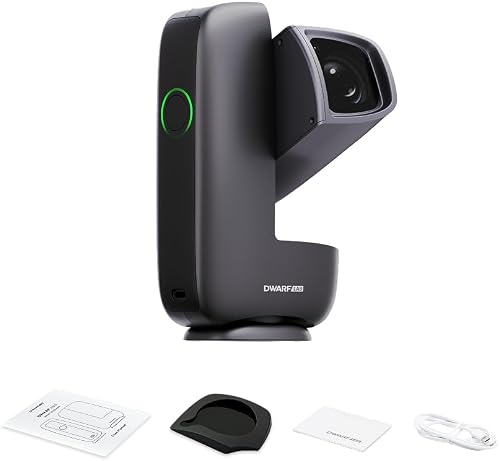
DWARFLAB Dwarf Mini Smart Telescope
Best for lightweight app-controlled imaging - 6
 Check it
DWARFLAB Dwarf 3 Smart Telescope
Best for day and night imaging - 7
 Check it
UNISTELLAR Odyssey Smart Telescope
Best for app viewing without an eyepiece
How we chose app-controlled telescopes
The best telescope with app features depends on whether you want guidance, automatic movement, phone photography, or app-based viewing. We compared the control method, observing style, optical design, and stated portability for each pick.
We gave preference to products whose app role is clear. The Gskyer is included as a phone photography option, but it has a wireless camera remote rather than app-guided aiming or motorized tracking.
Our score weighs specs, features, and buyer feedback against what you're shopping for. Brand descriptions of image quality and ease of use are claims, not guarantees of what you will see.
For help comparing manufacturers, read our telescope brand guide.
Compare telescope app features
App-assisted aiming, motorized tracking, and phone-based imaging are separate features. Use this comparison to see what each telescope automates and whether you'll observe through an eyepiece or a screen.
| Product | Best for | Optics | Control | Mount | Our score |
|---|---|---|---|---|---|
| ZWO Seestar S30 Pro Smart Telescope | app-led deep-sky imaging | 30 mm apochromatic | Smartphone or tablet app | Alt-azimuth; supports equatorial mode | 9.7 |
| Gskyer Telescope | phone-assisted snapshots | 70 mm refractor | Manual telescope; remote triggers phone camera | Alt-azimuth | 9.5 |
| Celestron NexStar 8SE Computerized Telescope | large-aperture GoTo viewing | 8 in Schmidt-Cassegrain | NexStar+ hand control; wireless control accessory compatible | Computerized alt-azimuth fork arm | 9.4 |
| Celestron StarSense Explorer LT 114AZ Newtonian Smartphone | guided eyepiece observing | 114 mm Newtonian reflector | Phone-guided aiming; manual telescope movement | Manual alt-azimuth | 9.3 |
| DWARFLAB Dwarf Mini Smart Telescope | lightweight app-controlled imaging | 30 mm objective | App with interactive sky map | Alt-azimuth and equatorial modes | 9.1 |
| DWARFLAB Dwarf 3 Smart Telescope | day and night imaging | Dual imaging system | Dedicated smartphone app | Alt-azimuth | 9.0 |
| UNISTELLAR Odyssey Smart Telescope | app viewing without an eyepiece | 85 mm; 320 mm focal length | UNISTELLAR app; no eyepiece | Alt-azimuth | 8.5 |
The best telescopes with apps for different observing styles
The right pick depends on whether you want a telescope that makes images for the app, a phone that guides your manual aiming, or a motorized scope controlled with a separate hand unit. Each option below suits a different kind of session.
ZWO Seestar S30 Pro Smart Telescope: Best for app-led deep-sky imaging
- App-controlled GOTO targeting and tracking
- Dual-camera 4K imaging
- Built-in light pollution filters
- Designed for deep-sky objects
App control, automatic GOTO and tracking, and one-tap imaging suit people who want the telescope to find and follow deep-sky targets. It is not intended for planetary observation.
Pros
- Automatic targeting and tracking
- Built-in light pollution filters
- Compact, travel-friendly design
Cons
- Not intended for planetary observation
- Keep stationary during deep-sky imaging
The Seestar S30 Pro puts app control at the center of the observing process. Connect the app, choose a target, and its automatic GOTO and tracking features find and follow celestial objects.
Its 30 mm apochromatic optics and built-in light pollution filters are aimed at imaging, including from bright urban areas. ZWO describes one-tap modes for deep-sky subjects, the Moon, and the Sun, but says this model is designed for deep-sky objects and is not intended for planetary observation.
The app shows the live sky view on a smartphone. Dual-camera 4K imaging, noise reduction, and automatic mosaic stitching are part of its imaging workflow.
At 3.64 lb, it is compact enough to take on trips. For deep-sky imaging, keep it stationary so tracking stays stable.
Choose the Seestar if you want the telescope to find targets and build phone images. If your main goal is observing planets directly through an eyepiece, choose an optical telescope designed for visual use.
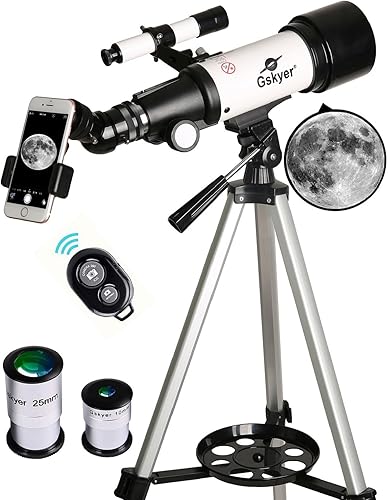
Gskyer Telescope: Best for phone-assisted snapshots
- 70 mm refractor with 400 mm focal length
- Smartphone adapter and wireless camera remote
- Manual focus
- Adjustable tripod and carry bag
A phone adapter and wireless camera remote let you frame and trigger phone photos through the telescope. Aiming and focusing remain manual.
Pros
- Phone adapter and wireless remote included
- Carry bag for storage and travel
- Manual optical viewing
Cons
- No app-guided aiming or automatic tracking
- Manual focus and target finding
The Gskyer is a manual 70 mm refractor with a smartphone adapter and wireless camera remote. The adapter holds a phone for pictures through the telescope, and the remote triggers the camera without touching the phone.
That arrangement can help reduce shake when taking a phone snapshot. It does not provide an app sky map, automatic aiming, or tracking, so you still locate the object and focus by hand.
The scope has a 400 mm focal length, an alt-azimuth mount, two eyepieces, and a 3x Barlow lens. A 5x24 finder helps with initial target location, while the adjustable tripod and carry bag support transport and storage.
Choose it if you want a basic refractor that can pair with a phone for photography and still uses eyepiece viewing. If you want the app itself to guide you to a target, compare it with the best computerized telescope for beginners.
Celestron NexStar 8SE Computerized Telescope: Best for large-aperture GoTo viewing
- 8-inch Schmidt-Cassegrain optics
- Computerized GoTo mount
- 40,000+ object database
- SkyAlign alignment
This computerized telescope finds and tracks selected objects through its included hand control. Wireless control is an accessory option, so app use depends on the setup you add.
Pros
- Large 8-inch aperture
- Automatic GoTo and tracking
- SkyAlign uses 3 bright stars or planets
Cons
- App control requires a compatible accessory
- Included control is a hand control
The NexStar 8SE is a computerized GoTo telescope controlled with its included NexStar+ hand control. Select from its database of more than 40,000 objects, align with SkyAlign, and the mount can slew to and track a target.
Its 8 in Schmidt-Cassegrain optics are the largest aperture in this group. Celestron describes the scope for lunar, planetary, and deep-sky observing, with an accessory path for wireless control through compatible add-ons.
The included setup is not app-first: the hand control is the supplied way to select objects. If phone or computer control matters, check the compatible accessories and software before choosing this telescope.
Choose it if you want a larger aperture and automated pointing for eyepiece observing. Our Celestron 114LCM computerized telescope review covers another computerized option with a different aperture and setup.
Celestron StarSense Explorer LT 114AZ Newtonian Smartphone: Best for guided eyepiece observing
- 114 mm Newtonian reflector
- Phone app with sky recognition
- Manual alt-azimuth mount
- On-screen arrows guide aiming
The StarSense Explorer app uses sky recognition and on-screen arrows to guide your manual aiming. You view through the eyepiece rather than through a live phone image.
Pros
- App recommends targets for your time and location
- 114 mm reflector
- Manual eyepiece observing
Cons
- Does not automatically move or track the telescope
- Requires a compatible smartphone
The StarSense Explorer LT 114AZ uses your smartphone to guide where you point a manual telescope. Dock the phone, open the StarSense Explorer app, and follow its arrows until the target indicator turns green.
Unlike the imaging-focused smart telescopes here, this design keeps normal eyepiece viewing. The 114 mm Newtonian reflector is specified for the Moon, planets, and deep-sky objects; the mount itself is manual, so it will not move or track a target automatically.
The app uses sky recognition and makes a list of suggested objects based on time and location. It can make starting out less dependent on learning a star chart, while leaving you in control of the telescope's movement.
Choose it if you want phone guidance and direct views through an eyepiece. For a separate workflow that connects a scope to a computer, see how to connect a telescope to a laptop.
DWARFLAB Dwarf Mini Smart Telescope: Best for lightweight app-controlled imaging
- 1.85 lb compact design
- App sky atlas and Auto GOTO
- 360-degree pivot
- Equatorial mode and up to 90-second exposures
A built-in sky atlas, Auto GOTO, and automatic tracking put app-led imaging in a compact 1.85 lb unit. Equatorial mode and long exposures add options for deep-sky photos.
Pros
- Lightweight, compact design
- App sky atlas and automatic targeting
- Built-in light pollution filters
Cons
- Phone app is central to aiming and imaging
- Deep-sky imaging needs a stationary setup
The DWARFLAB Dwarf Mini combines a compact body with app-based target selection and automatic movement. Its interactive sky atlas lets you choose a target, and Auto GOTO and tracking handle aiming and following.
At 1.85 lb, it is the lightest option here by stated weight. The device supports alt-azimuth and equatorial modes, and the brand describes exposures up to 90 seconds, built-in light pollution filters, and cloud-based image processing.
This is a smart imaging telescope rather than a traditional eyepiece scope. Choose it for portability and app-led astrophotography; for visual observing through an eyepiece, look at the StarSense Explorer instead.
DWARFLAB Dwarf 3 Smart Telescope: Best for day and night imaging
- App-controlled image processing
- Automatic tracking and GOTO
- Dual imaging system
- 3 lb portable design
The dual imaging system covers night sky subjects and daytime wildlife or landscapes. Its app handles one-touch image processing, with automatic tracking for imaging.
Pros
- Dual imaging system for day and night
- Automatic tracking and GOTO
- Portable design
Cons
- Imaging-centered design rather than eyepiece viewing
- Cloud processing is part of the workflow
The Dwarf 3 is an app-controlled imaging system with a dual imaging design for night and daytime subjects. Its dedicated app handles one-touch processing, while automatic tracking and GOTO support imaging sessions.
The 3 lb design includes a telephoto lens for deep-sky subjects and wildlife, plus a wide-angle lens for the Milky Way and star trails. For more options, see telescopes for wide-field astrophotography.
The phone app is central to capturing and processing images, so it fits people who want digital results rather than a conventional eyepiece view.
Choose the Dwarf 3 if you want one compact setup for sky imaging and daytime subjects. If your priority is an eyepiece, a phone-guided manual telescope will be a closer fit.
UNISTELLAR Odyssey Smart Telescope: Best for app viewing without an eyepiece
- 85 mm optics and live image stacking
- App viewing on compatible phone or tablet
- Automatic focus and target finding
- Motorized tracking
The app provides control and viewing, while live image stacking builds detail during an observing session. This design has no eyepiece, and its Wi-Fi works without internet after the app is downloaded.
Pros
- Automatic focus and target finding
- Live image stacking
- Wi-Fi works without internet after app download
Cons
- No eyepiece viewing
- Results depend on target, sky conditions, and observing time
The UNISTELLAR Odyssey offers app viewing with automatic focus, target finding, and tracking. Choose from more than 5,000 catalog objects, then view the live stacked image on a compatible phone or tablet.
Its 85 mm optics and Multi-Depth Technology are intended for planets and deep-sky objects. Image detail builds during observation, and results depend on the target, sky conditions, and time spent collecting light.
The Odyssey has no eyepiece, so the phone or tablet is the viewing screen. Its Wi-Fi works without internet after app download, which can help at remote observing locations.
Choose it if you want app-based live viewing and an automated system with a tripod included. Choose an eyepiece telescope if you prefer a direct optical view or want a more familiar visual astronomy setup.
Which app-controlled telescope style should you choose?
Choose by the kind of help you want from the app. A phone that points you toward a target is different from a telescope that moves itself or sends a live image to your screen.
Do you want the best telescope with app-guided aiming?
Choose the Celestron StarSense Explorer LT 114AZ if you want your phone to show where to point while you look through an eyepiece. Its mount is manual, so you follow the app's arrows and move the telescope yourself.
For more options focused on computerized object finding and tracking, see our guide to telescopes with automatic tracking.
Do you want automatic tracking and app imaging?
Choose the Seestar S30 Pro, Dwarf Mini, Dwarf 3, or Odyssey if you want a smart imaging system that handles more of the aiming or image workflow. The Odyssey and Seestar show a phone-based view, while the Dwarf models are designed around app-based capture and processing.
The Seestar is specified for deep-sky imaging, while the Odyssey is described for planets and deep sky. Match the scope's intended targets to what you want to photograph.
Do you mainly want to take phone pictures?
The Gskyer includes a phone adapter and wireless camera remote, but it remains a manual telescope. It suits phone snapshots through the scope, not app-based target finding or tracking.
If a wired phone connection is your main concern, see which telescopes can connect to a smartphone by USB. For computer-based control and image workflows, compare telescopes with USB connection and software.
What should you check before choosing a telescope app?
Check what the app controls, how you view the target, and whether your phone meets compatibility needs. These details help avoid buying an imaging system when you expected eyepiece viewing, or a guide app when you wanted automatic tracking.
Confirm whether the telescope moves automatically. StarSense Explorer guides manual aiming, while motorized GoTo systems can move the mount after alignment.
Check the viewing method. A telescope with an eyepiece supports direct optical viewing; a smart telescope may show its camera image on your phone instead.
Review phone and connection requirements before buying. The Odyssey requires Android 10 or later or iOS 18 or later, and the StarSense Explorer app supports modern phones with stated platform requirements.
Consider target type and setup. Some smart models are intended for deep-sky imaging, while others offer planetary use; stationary placement can matter for stable long-exposure imaging.
More guides on this topic
- How to Connect a Celestron Telescope with ASCOM
Which is the best telescope with app control for you?
Pick the Seestar S30 Pro for app-led deep-sky imaging with automatic targeting and tracking. Choose the StarSense Explorer LT 114AZ if you want the phone to guide manual aiming while you observe through an eyepiece.
The Gskyer is the phone-photo choice for a simple manual refractor. Choose the NexStar 8SE for computerized GoTo eyepiece observing, or the Odyssey if you want app viewing without an eyepiece.
Our top 3 picks at a glance
-
1
Best for app-led deep-sky imaging
ZWO Seestar S30 Pro Smart Telescope
9.7/10 our score
See it on Amazon -
2
-
3
Best for large-aperture GoTo viewing
Celestron NexStar 8SE Computerized Telescope
9.4/10 our score
See it on Amazon
Frequently asked questions
What does app-controlled mean on a telescope?
It can mean phone-guided aiming, wireless control of a motorized mount, or viewing and imaging through a smart telescope app. Check which job the app does: StarSense Explorer guides you as you move a manual telescope, while Seestar can automatically target and track objects.
A phone adapter for taking pictures is another feature, but it does not make a telescope app-controlled.
Can I look through an app-controlled telescope?
Some app-assisted telescopes use a normal eyepiece, while smart imaging telescopes show the view on a phone or tablet. The Celestron StarSense Explorer LT 114AZ guides your aim and keeps eyepiece viewing; the UNISTELLAR Odyssey uses app viewing and has no eyepiece.
Decide whether you want direct optical viewing or a screen-based observing session.
Does a telescope app make the telescope track objects?
Only if the telescope or its mount has motorized tracking. StarSense Explorer uses your phone to show where to aim, but the mount is manual.
Seestar and the computerized NexStar 8SE can track targets after setup.
Check whether tracking is built in or needs an accessory.
Can I use a telescope app without internet?
It depends on the telescope and app. UNISTELLAR says its telescope Wi-Fi works without internet after you download the app.
For other systems, check whether setup, target catalogs, image processing, or remote access needs a connection.
App compatibility and offline features can vary by phone and software version.
Are app-controlled telescopes good for viewing Saturn?
They can be, but the observing design matters. A telescope with an eyepiece, such as the Celestron StarSense Explorer LT 114AZ or NexStar 8SE, supports direct visual viewing; some smart imaging models focus on camera images and may not suit planets.
Check the target strengths before choosing, and see our guide to Saturn through a telescope.