What Is the Cheapest Smart Telescope?
The cheapest smart telescope depends on what you mean by smart: basic app guidance can come from a low-cost manual telescope, while a telescope that automatically finds targets and captures images usually costs more. Compare the help you want with the compromises you can accept.
On this page (8 sections)
- What is the cheapest smart telescope for your needs?
- What does “smart telescope” mean?
- Can you get a smart telescope under 1,000 dollars?
- What affordable alternatives are worth considering?
- Is an app-controlled telescope the same as a smart telescope?
- Which trade-offs matter most on a budget?
- How should you choose a cheap smart telescope?
- Frequently asked questions
The cheapest smart telescope depends on which smart features you want. A basic telescope paired with a sky app can help you find objects for less, while automatic pointing, tracking and imaging require more specialized equipment.
A low price can mean giving up automation, a built-in camera or ease of setup. Start by deciding whether you want help identifying targets, automatic GoTo movement, or a telescope that captures images through an app.
What is the cheapest smart telescope for your needs?
The cheapest option is often a manual telescope plus an astronomy app, if guidance is enough and you are comfortable aiming the scope yourself. A fully automated smart telescope costs more because it combines optics with electronics and imaging features.
“Smart telescope” can mean several things:
| What you want | What to look for | Main compromise |
|---|---|---|
| Help identifying objects | A manual scope and sky app | You aim and track by hand |
| Automatic target finding | Computerized GoTo mount | Alignment and power are part of setup |
| Phone control | App-compatible telescope or mount | App control may not include a camera |
| Automatic imaging | Smart telescope with camera and image software | More cost and a workflow to learn |
A telescope that works with an app is not automatically an imaging telescope. Read the feature list closely, and compare the best app-controlled telescopes if phone control is your main priority.
If you are comparing a traditional telescope with camera support against a smart imaging scope, our guide to the best computer-controlled telescope with camera can help clarify the difference.
What does “smart telescope” mean?
A smart telescope uses electronics or software to make one or more parts of observing easier. The label does not guarantee a camera, automatic pointing, or a phone app, so check what the specific telescope actually does.
Some models use a computerized mount to locate and track selected sky objects. Others connect to an app for guidance, while smart imaging telescopes combine a camera and software to collect and display images.
For wide views, compare the best telescopes for wide-field astrophotography.
For a specific example, read our Seestar S30 Pro review.
The word “smart” can also refer to the observer’s phone rather than the telescope. An astronomy app can show where objects are in the sky, but it cannot move a manual telescope for you.
For a closer look at the options, use our smart telescope buying guide. It helps you weigh optics, setup, automation and imaging before you choose.
Can you get a smart telescope under 1,000 dollars?
You may find smart or app-guided options under 1,000, dollars but the features and compromises matter more than the label. Set a budget for the complete setup, then confirm what is included and what you would need to add.
Searches for the best smart telescope under 1,000 dollars can turn up different kinds of products. One may have a computerized mount but no built-in imaging system; another may focus on app guidance or portability.
Before deciding, check these points:
- Target finding: Does the telescope move to objects, or does an app only help you locate them?
- Tracking: Does the mount follow an object after you find it?
- Imaging: Is a camera built in, or do you need separate equipment?
- Setup: Does the system need alignment, external power or a phone connection?
- Optics: Is the telescope suited to the Moon, planets, deep-sky objects or daytime viewing?
- Included items: Are the tripod, eyepieces, software and needed cables part of the package?
A “best smart telescope for under 1,000 dollars” list is only useful if it compares models with similar features. For beginner-focused choices, see our guide to the best smart telescope for beginners.
What affordable alternatives are worth considering?
Affordable alternatives can give you good observing options without pretending to be fully automated smart scopes. Choose based on what you want to see and how much help you need finding it.
The telescopes below illustrate different paths: a larger manual reflector, a portable refractor, and a computerized GoTo telescope. They are not all smart telescopes, but they show how price, portability and automation can pull a buying decision in different directions.
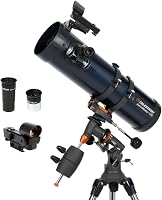
Celestron AstroMaster 130EQ: manual control and a larger aperture
The AstroMaster 130EQ suits beginners who want a 130 mm reflector and are willing to point it manually. Its equatorial mount has slow-motion controls for adjusting right ascension and declination.
The telescope includes 20 mm and 10 mm eyepieces and a StarPointer red dot finderscope. It can be a fit if you want to learn how to aim and follow objects rather than have the mount find targets for you.
Celestron Travel Scope 70: portability and simple setup
The Travel Scope 70 suits a beginner who values a light, portable setup for night sky and daytime viewing. Its 70 mm refractor comes with a backpack, a tripod and two eyepieces.
This is a manual telescope, so it does not provide automatic GoTo pointing. Its small size and included backpack may matter more to someone who wants to bring a telescope on trips than to someone focused on automation.
Celestron NexStar 8SE: computerized pointing
The NexStar 8SE is the computerized option here, with an 8-inch Schmidt-Cassegrain telescope and a GoTo mount. Its hand control includes a database of more than 40,000 objects, and SkyAlign uses three bright stars or planets to align the system.
It is a different kind of purchase from a basic app-guided scope. Consider it if automated locating and tracking matter more than finding the lowest-cost entry point.
For additional build-it-yourself context, see how to make a smart telescope. A DIY approach may suit someone who enjoys learning how the parts work, but it takes time and does not guarantee lower total cost.
Is an app-controlled telescope the same as a smart telescope?
An app-controlled telescope is one kind of smart telescope, but app access alone does not mean automatic pointing or imaging. Check whether the app controls the mount, guides you to targets, or processes camera images.
Some telescopes can connect to a phone for sky maps or control. Others use a hand controller, and some imaging systems rely on a phone or tablet to display results.
Ask what happens after you select a target. If the mount moves and tracks it, that is a different capability from an app that simply shows where to point.
Which trade-offs matter most on a budget?
The biggest budget trade-off is usually choosing which convenience to give up. You might save money by aiming manually, accepting a smaller aperture, or choosing a simpler imaging setup.
- Manual aiming costs less in electronics but takes practice.
- Smaller optics can make a telescope easier to carry, though they gather less light than larger optics.
- Basic app guidance can help you learn the sky without moving the telescope for you.
- Computerized mounts add target-finding help, but alignment and power become part of the setup.
- Imaging systems can make viewing more shareable, but the camera and software affect the experience.
Avoid paying for features you will not use. If you mostly want to view the Moon and bright planets, prioritize a setup that is easy to carry and use; if finding faint targets is your main challenge, consider a computerized mount.
How should you choose a cheap smart telescope?
Choose by the task you want the telescope to handle for you, then check the complete setup and its limitations. A lower purchase cost does not help if the features miss your actual goal.
Use this decision path:
- If you want help learning constellations, start with a manual telescope and a sky app.
- If you want the mount to find objects, look for computerized GoTo operation and read the alignment steps.
- If you want images on a phone or tablet, confirm that camera capture and image display are included.
- If you plan to travel, compare total weight, setup time and what fits in the carrying case.
- If you are uncertain, choose the simplest system that meets your main goal.
When brand support and product range are part of your comparison, our overview of what makes a good telescope brand may help. For planetary viewing, also compare the capabilities in our best telescopes for planets guide.
The best choice is not always the one with the most automation. Pick a manual model if learning to aim matters most, a portable scope if travel matters most, or a computerized system if automatic target finding is worth the added complexity.
Frequently asked questions
What is the cheapest smart telescope?
There is no single cheapest model for every definition of smart. A manual telescope paired with an astronomy app may help you identify targets at a lower cost, while a smart telescope that locates and images targets automatically needs more built-in technology.
Decide which features you actually want before comparing models.
Can a regular telescope work with a phone app?
Yes. An astronomy app can show the sky and help you plan what to observe, even when your telescope points manually.
You still need to aim and track the target yourself unless the telescope has a computerized mount or another automated system.
Is a smart telescope under 1,000 dollars worth considering?
It can be, if you accept trade-offs in aperture, automation, portability or imaging features. Compare the telescope's real capabilities with your observing goals, then include any accessories you need in your budget.
Prices and availability change, so check current details before buying.
Can a computerized telescope take photos automatically?
A computerized GoTo mount can locate and track selected objects, but that alone does not mean the telescope includes a camera or takes finished images automatically. Check the imaging equipment and workflow separately.
A computer-controlled mount is useful for finding targets, while imaging needs compatible capture equipment.
Should beginners buy a smart telescope or a manual telescope?
Choose a smart telescope if automated target finding or imaging is central to your plans. A manual telescope can be a better fit if you want to learn the sky, keep setup simpler, or spend more of your budget on the optics.
Think about what you will use each clear night.
Frequently asked questions
What is the cheapest smart telescope?
There is no single cheapest model for every definition of smart. A manual telescope paired with an astronomy app may help you identify targets at a lower cost, while a smart telescope that locates and images targets automatically needs more built-in technology.
Decide which features you actually want before comparing models.
Can a regular telescope work with a phone app?
Yes. An astronomy app can show the sky and help you plan what to observe, even when your telescope points manually.
You still need to aim and track the target yourself unless the telescope has a computerized mount or another automated system.
Is a smart telescope under 1,000 dollars worth considering?
It can be, if you accept trade-offs in aperture, automation, portability or imaging features. Compare the telescope's real capabilities with your observing goals, then include any accessories you need in your budget.
Prices and availability change, so check current details before buying.
Can a computerized telescope take photos automatically?
A computerized GoTo mount can locate and track selected objects, but that alone does not mean the telescope includes a camera or takes finished images automatically. Check the imaging equipment and workflow separately.
A computer-controlled mount is useful for finding targets, while imaging needs compatible capture equipment.
Should beginners buy a smart telescope or a manual telescope?
Choose a smart telescope if automated target finding or imaging is central to your plans. A manual telescope can be a better fit if you want to learn the sky, keep setup simpler, or spend more of your budget on the optics.
Think about what you will use each clear night.